
Best Habit Tracker Apps for Android (2026)
Tenor
Tenor Editorial Team
In the crowded world of productivity tools, habit-tracker apps have surged in popularity. These apps log daily behaviors, count streaks, and visualize your consistency, turning small daily actions into lasting routines. Many modern trackers feature sleek calendars, charts, or tile grids for one-tap logging. For example, Tenor provides a year-long grid to "paint" your progress, while apps like Loop use detailed graphs of your habit strength. Choosing the right tracker depends on your needs (privacy, gamification, multi-device sync, etc.). Below we compare the top Android habit-tracker apps of 2026 — including Tenor and five leading competitors — and share tips to help build your ideal habit-tracking system.
What Are Habit Tracker Apps?
Habit-tracker apps help you record and reinforce daily behaviors. Each time you complete a habit (e.g. exercise, drink water, meditate), you log it in the app. The app then visualizes your progress — often as a streak count, color-coded chart, or calendar heatmap. For instance, Loop Habit Tracker displays a single-tap interface and charts showing how your habits strengthen over time. Over weeks and months, this visual feedback encourages you to maintain consistency (if you miss a day, many apps either pause or gently discourage streak-breaking rather than "reset to zero"). In short, habit trackers turn good intentions into concrete daily actions by providing reminders and motivation.
Why Use a Habit Tracker?
Building a new habit on your own can be hard. Studies show it takes an average of 66 days for a behavior to become automatic. A tracker app provides accountability during this period. Instead of relying on willpower alone, you get daily prompts, progress stats, and a clear record of your success. This keeps you honest and motivated — after all, nobody wants to break a long streak once it's visible on-screen. Habit trackers also let you refine your routine: you can experiment with daily vs. weekly goals, pause habits, or focus on one habit at a time. Over time, you learn which tactics actually help you stick to your goals.
Top Habit Tracker Apps (2026)
Below are six leading habit-tracker apps for Android (free and paid). We include Tenor (our app) and five others, summarising platforms, key features, and best use-cases in each.
| App | Platform(s) | Free / Paid | Key Features | Best for | Play Store Rating | Link |
|---|---|---|---|---|---|---|
| Tenor | Android | Free (freemium: adds cloud backup) | Calendar heatmap, flexible scheduling (daily/weekly), no login (local data) | Users who value privacy and visual consistency | N/A (new) | Google Play |
| Loop Habit Tracker | Android | Free (open-source) | Detailed charts, habit strength score, fully offline | Privacy-minded and budget users | 4.8 (57K) | Google Play |
| HabitNow | Android | Free (one-time unlock upgrade) | Combines habit tracking with a to-do list/calendar, timers, reminders | Users needing an all-in-one routine planner | 4.7 (91K) | Google Play |
| Habitica | Android, iOS, Web | Free (optional subscription) | Gamified RPG-style habits (quests, rewards), strong social/community features | Gamification lovers and social accountability | 4.5 (71K) | Google Play |
| Productive | Android, iOS | Freemium (subscription for full features) | Simple interface, daily habit programs, statistics, motivational streaks | Casual users who want guidance & coaching | 3.7 (20K) | Google Play |
| Habitify | Android, iOS, Web | Freemium (one-time purchase or subscription) | Cross-device sync, scheduling by day/area, focus timer, data visualizations | Users wanting advanced analytics and sync | 4.3 (6.5K) | Google Play |
Ratings from Google Play, Aug 2026.
Tenor (Android) — Calm, Private Habit Tracking
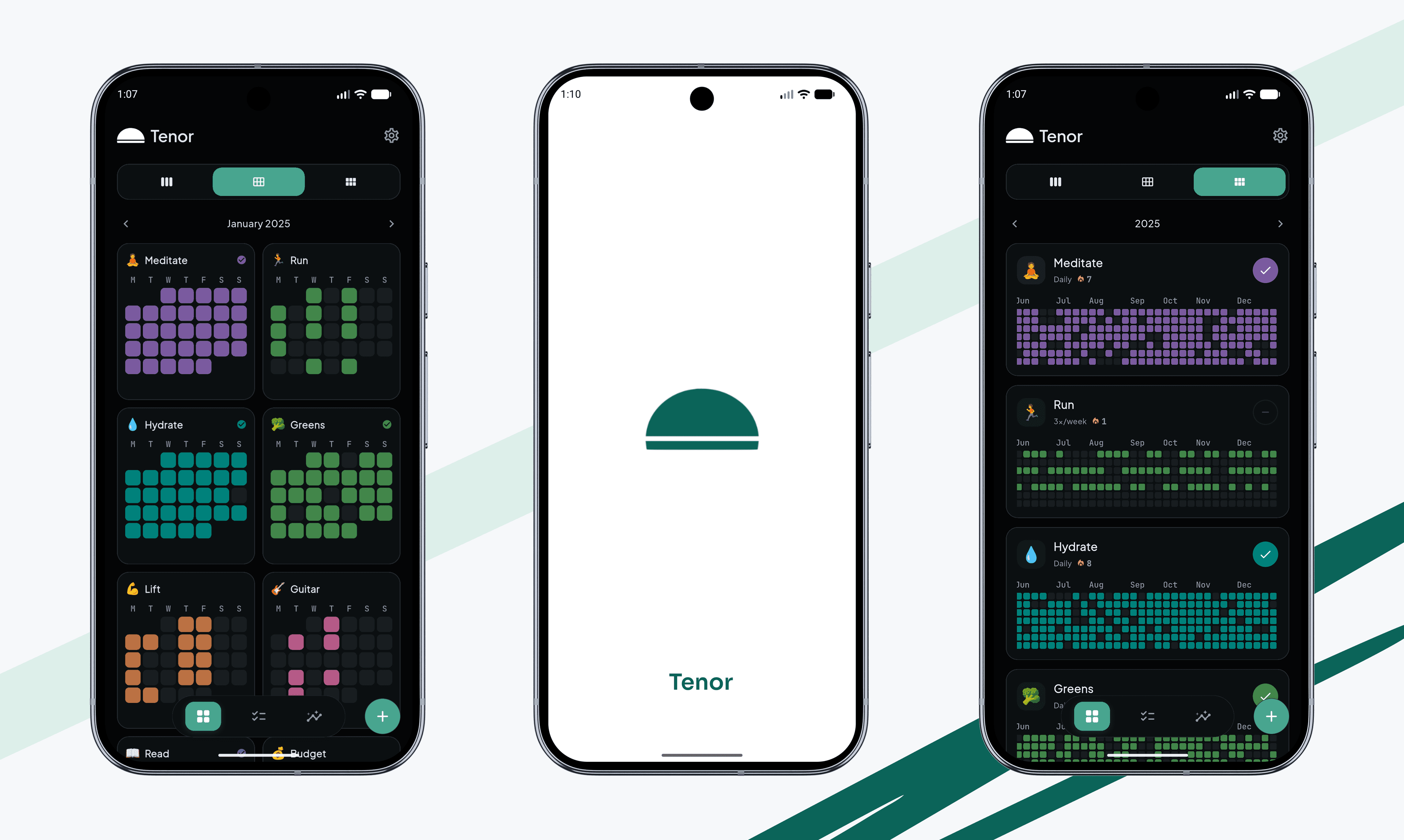
Tenor is an Android-native habit tracker designed for long-term consistency. It uses an "annual heatmap" view (like GitHub contributions) to show your progress, letting you paint each day of your year. Unlike streak-based apps, Tenor's algorithm focuses on overall consistency (a missed day won't "kill" your progress). All data stays on-device (no login required), appealing to privacy-conscious users. Key features include one-tap habit logging (under 2 seconds) and flexible goals (daily/weekly/monthly). Tenor also offers widgets for quick check-offs and detailed analytics (consistency/momentum scores). If you want a calm, non-gamified approach that integrates your routine into a timeline, Tenor is a strong pick.
Loop Habit Tracker (Android) — Open-Source & Offline
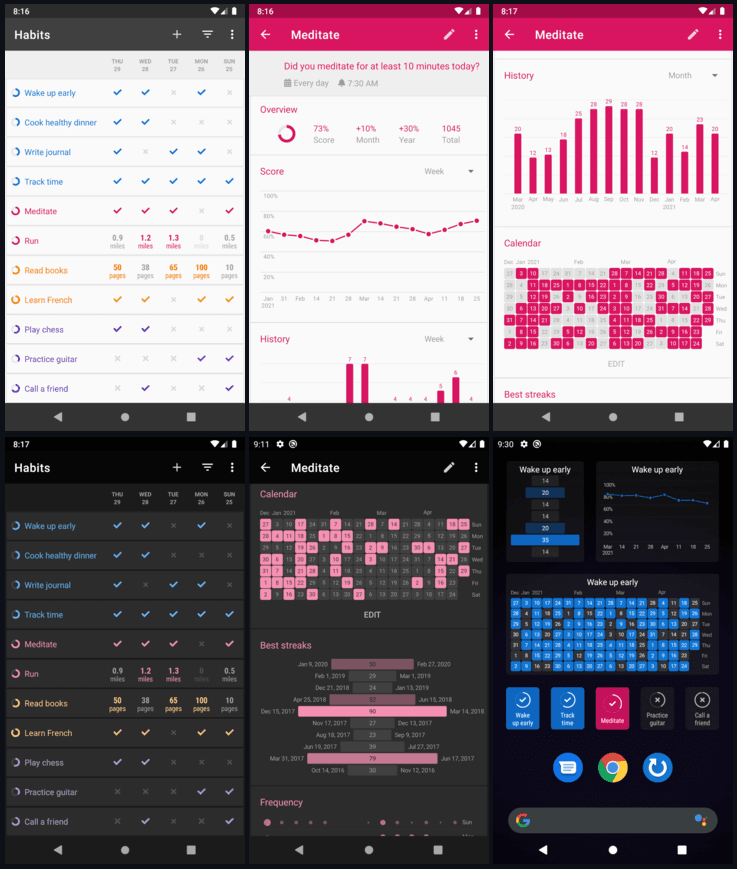
Loop Habit Tracker is a veteran Android app that's entirely free and open-source. It emphasises privacy and simplicity: there are no ads, no accounts, and it works fully offline. You create habits, set flexible schedules (daily, every other day, specific weekdays, etc.), and view rich charts. Loop calculates a "habit strength" score for each habit based on streaks and misses. It also supports home-screen widgets for one-tap checking. Because it's Material Design compliant and highly customizable, Loop is ideal if you want a no-frills, privacy-first tracker with robust analytics and no cost. The only downside is its UI is quite utilitarian, but many users appreciate its focus on data over gamification.
HabitNow (Android) — All-in-One Planner
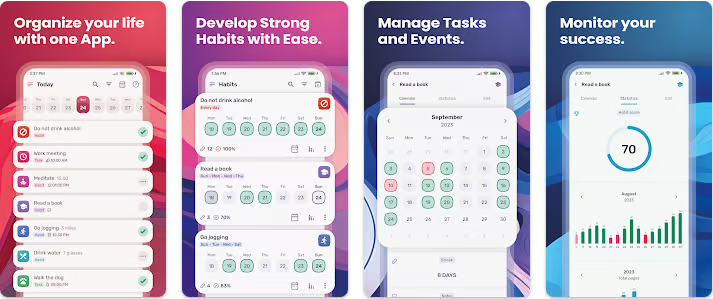
HabitNow is an Android planner that merges habit tracking with tasks and timers. You can define unlimited habits and to-dos, schedule them (daily, weekly, monthly), and set custom reminders or alarms. Unique features include a focus timer (Pomodoro), interval timers, and detailed progress stats. The free version lets you add habits and goals; a one-time premium unlock adds more customization. HabitNow's interface is user-friendly and it even supports calendar integration, Google Fit sync, and Wear OS. This makes it perfect for someone who wants a comprehensive, all-in-one routine manager on Android. It scored 4.7★ on Google Play (92K reviews), reflecting its popularity.
Habitica (Android, iOS, Web) — Gamified RPG-Style Tracking
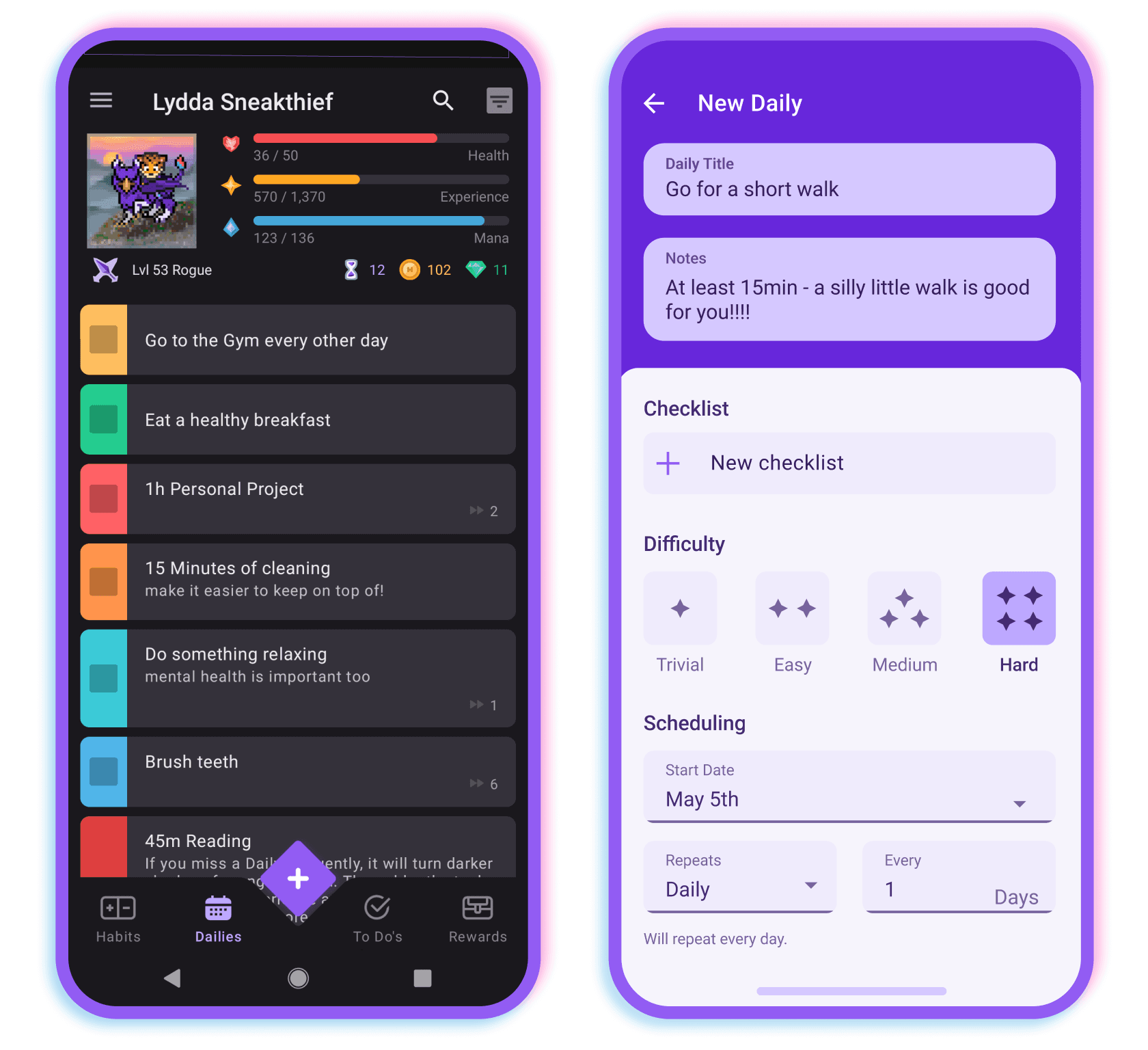
Habitica turns your habits into a game. Each habit you log gives your avatar experience points, gold, and gear. You can join parties with friends, tackle quests and challenges together, and treat daily tasks as monsters to slay. This strong RPG element (plus social accountability) makes Habitica highly motivational if you like gaming. Habitica also includes traditional to-do lists and supports recurring tasks. It's multi-platform and cross-syncs between devices. The core app is free (with ads), and optional subscriptions remove ads and unlock more features. If standard checklists bore you, Habitica's game mechanics can help make habit tracking fun. (Current rating is 4.5★ on Google Play.)
Productive (Android, iOS) — Guided Habit Coaching
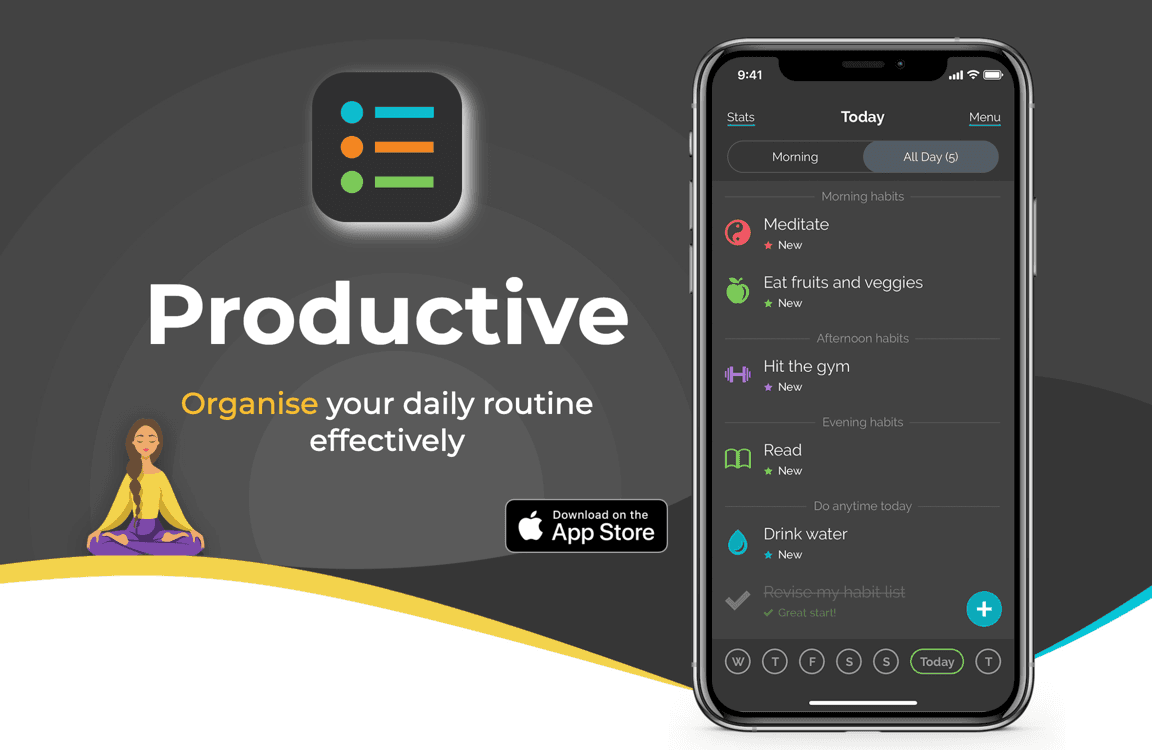
Productive is designed for building positive routines through structured programs. It has a polished, simple interface. You can plan up to 24 habits, organize them by time of day or category, and join timed challenges (e.g. "21-Day Productivity Boost"). The app emphasizes tracking streaks and visual progress charts to encourage daily use. A premium subscription (or one-time purchase) unlocks unlimited habits, improved reminders, and personal themes. Productive works on Android and iOS. It scored 3.7★ (20K reviews) on Google Play. Productive is best for users who want a coach-like experience with programs and reminders that keep them on track without too much complexity.
Habitify (Android, iOS, Web) — Cross-Device Analytics
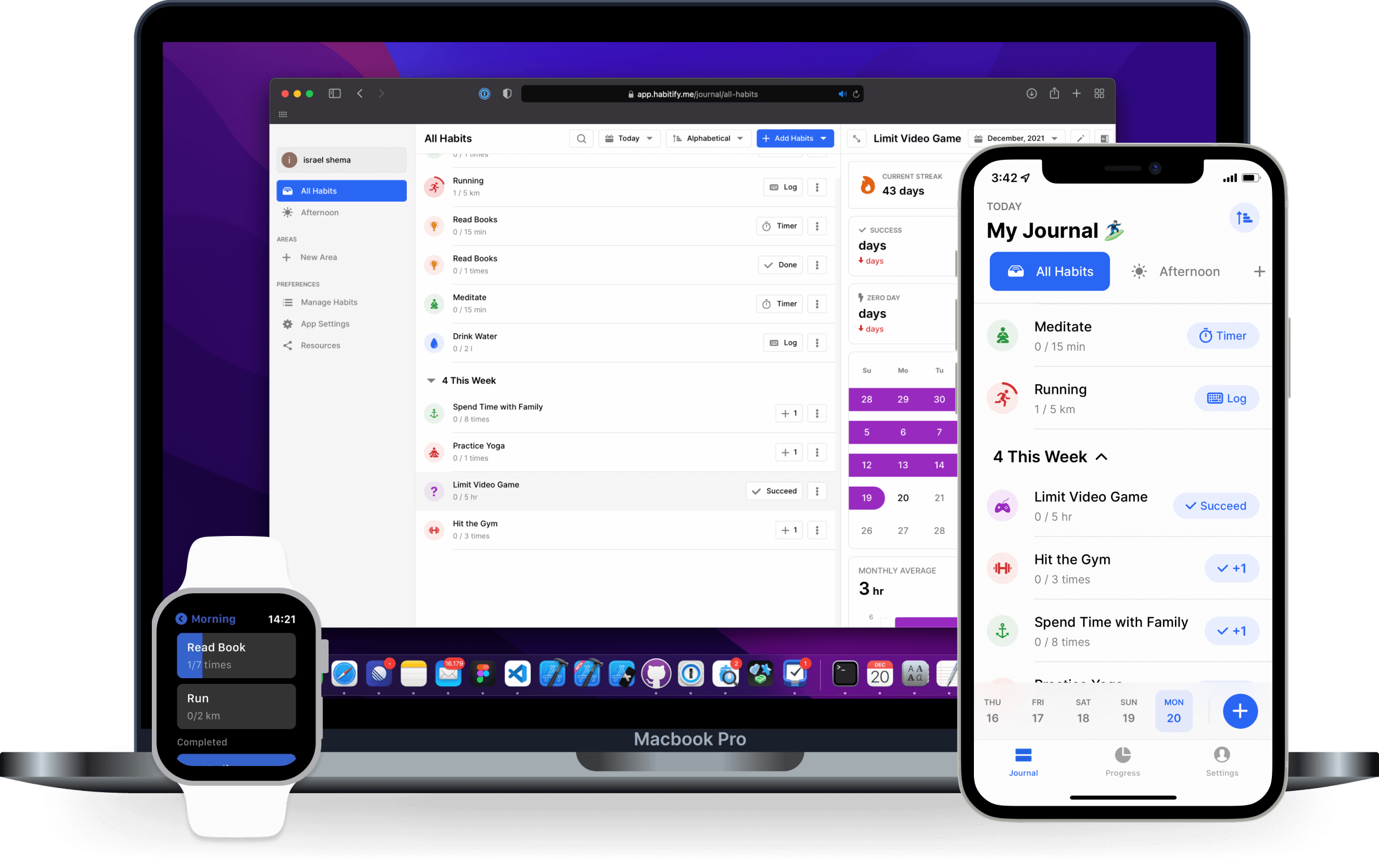
Habitify offers a clean, attractive interface and syncs across phone, tablet, and desktop. You create habits and assign them to parts of your day (morning, afternoon, evening) or custom areas. It includes a focus timer and integrates with Apple Health or Google Fit to track health habits. Habitify's standout feature is its analytics: detailed charts, trends, heatmaps, and personal bests help you see your performance. It also supports 3rd-party device integration (Wear OS, Garmin). The basic plan is free for up to 3 habits; premium unlocks unlimited habits and advanced reminders. With a 4.3★ rating, Habitify is suited for users who value cross-platform syncing and data insights for habit patterns.
Choosing the Right Habit Tracker
With so many options, pick an app that fits your workflow. Android users should look for Material Design interfaces, widgets, and integration (e.g. Google Fit, Google Assistant, Wear OS). Decide if you prefer gamification (Habitica) or a minimal approach (Loop, Tenor). Consider platform: do you need iOS/desktop support (Habitify, Habitica) or is Android-only fine? Check pricing models: some trackers require subscriptions for full features (Productive, Habitify), while others are fully free (Loop, Tenor basic). Try to match the app's style to your personality: if you like community and quests, pick a gamified app; if you just want a simple tick-off, go minimal. Most importantly, commit to using it daily — set realistic goals and let the app visualize your progress.
Key Features to Look For
When evaluating a habit tracker, focus on features that support your goals.
- Reminders: Can you schedule alerts or notifications? Tenor and many others allow custom reminders.
- Habit flexibility: Some apps only do daily habits, while others let you set weekly goals or skip days.
- Progress visualization: Graphs, charts, streak counters, or heatmaps help you see improvement. Tenor's heatmap and Habitify's charts, for example, make trends visible.
- Widgets / home screen: Quick-access widgets let you check off habits without opening the app.
- Privacy & data: If you care about privacy, choose apps with local storage. Loop and Tenor keep all data on your device.
- Cross-device sync: If you switch devices, ensure sync is supported (Habitify, Habitica, and HabitNow do).
- Community / gamification: Some users stay motivated by social features or game-like rewards (Habitica). Others find those distracting. Tenor intentionally has no gamification, focusing instead on calm consistency.
Habit Tracking Tips
- Start small. Pick 1–3 habits to track, so you don't feel overwhelmed.
- Be consistent. Log habits immediately after doing them (set a routine time to check your tracker).
- Use reminders wisely. Enable notifications only if they help; silence them if they become nagging.
- Review progress. Check your stats or calendar weekly to see trends. Adjust goals if needed.
- Find accountability. Share your goals with a friend or join an app community (Habitica parties, for example). Some apps like Tenor also let you share habits with peers for gentle nudges.
- Don't fear imperfection. Missing a day is fine. Focus on overall trends, not obsessing over a perfect streak. Most trackers (including Tenor) don't "penalize" you heavily for occasional misses.
Conclusion
Building better habits is a journey. The right app can make it easier by keeping you motivated and organized. We've compared six top Android habit trackers — from Tenor's privacy-first design to Loop's open-source simplicity to Habitica's gamified approach. Each has strengths: Tenor excels at visual consistency, Loop at privacy and offline use, HabitNow at integrated planning, and so on. Try one that matches your style.
Tenor (Android) offers a calm habit-building experience with no ads or logins — download it on Google Play to start painting your habit grid.

Tenor's unique features (heatmaps, local data, gentle reminders) make it a standout if you value long-term focus and privacy. Whatever you choose, stick with it daily. Over time, tracking even small habits will pay off in lasting routines.
FAQ
What is a habit tracker app?
Habit tracker apps are tools that log daily behaviors, count streaks, and visualize your consistency over time. They help turn repeated actions into lasting habits by reminding you to track activities each day.
Why use a habit tracker?
Tracking habits provides accountability and motivation. Research shows new behaviors take an average of 66 days to become automatic, so an app helps maintain consistency during this period with reminders and progress charts.
Are habit tracker apps free?
Many habit trackers offer free versions. For example, the Loop app is completely free and open-source. Others like Tenor or Productive have basic free tiers with optional premium upgrades for extra features.
Which is the best habit tracker app?
Top habit tracker apps in 2026 include Loop and HabitNow for Android users, as well as cross-platform choices like Habitica and Habitify. The "best" app depends on your needs (e.g. privacy vs. gamification) — this article compares the leading ones.
Does Tenor offer anything unique?
Yes. Tenor emphasizes privacy and calm tracking. It requires no login (all data is stored locally) and uses advanced analytics so that a single missed day never destroys your streak. Its interface visualizes a year-long habit grid for clarity.
Can habit trackers work offline?
Yes. Many habit tracker apps work fully offline. For instance, Loop Habit Tracker doesn't require an internet connection; all data remains on your device. This ensures your habits can be logged anywhere.
Do habit tracker apps have home-screen widgets?
Most top apps include widgets for quick access. Android habit trackers like Loop and HabitNow support home-screen widgets to check off habits without opening the app. This makes daily tracking faster and more convenient.
Do habit trackers sync with fitness apps like Google Fit?
Many habit apps integrate with fitness platforms. For example, HabitNow can sync with Google Fit, automatically importing steps or workouts as habits. This lets you use real-world health data as part of your habit routine.
Related Reading
If you want to understand why so many habit apps fall short, read why most habit trackers fail. If you prefer visual progress, see how habit streak calendars and stats keep you motivated. And if personalization matters to you, check out our guide on widgets, icons, and colors.
Enjoyed this? Share it with a friend.
Share on X